Your WhatsApp, inside HubSpot.
Scan a QR code. Conversations start recording in your CRM automatically: contacts matched, deals updated, workflows triggered. No API, no approval process, no changing numbers.
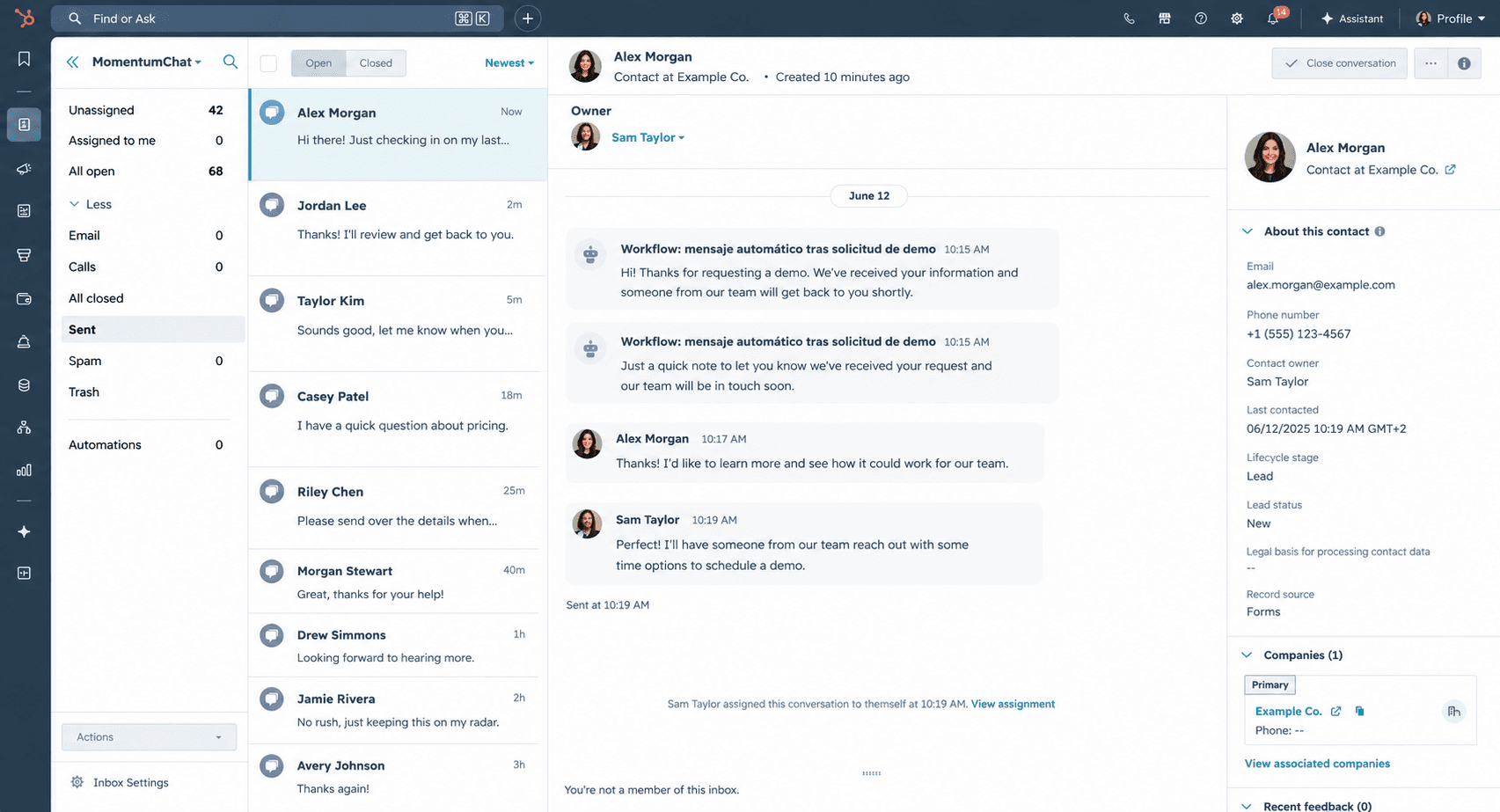
WhatsApp conversations don't belong on someone's phone.
Every deal discussed on WhatsApp that never reaches your CRM is a data point you can't act on. Your team knows what's happening. Your pipeline doesn't.
The WhatsApp Business API was supposed to fix this, but the approval process takes weeks, requires a dedicated number you probably don't want, and costs money before you've sent a single message.
Third-party connectors add another layer of complexity without solving the core issue: conversations still happen in one place and get logged in another, manually, when people remember to do it.
Conversations stay on the phone
Sales reps close deals over WhatsApp. None of it reaches the CRM. Management is flying blind.
API approval takes months
Meta's verification process is slow, requires a business account, and locks you into per-message fees after approval.
Manual logging doesn't scale
Copy-pasting conversations into notes works for one rep. It breaks with five.
Connect in 30 seconds. Use it like any other HubSpot channel.
Connect
Open HubSpot Inbox settings and click Connect MomentumChat. Scan the QR code with your phone, the same way you'd open WhatsApp Web. No API keys, no business account.
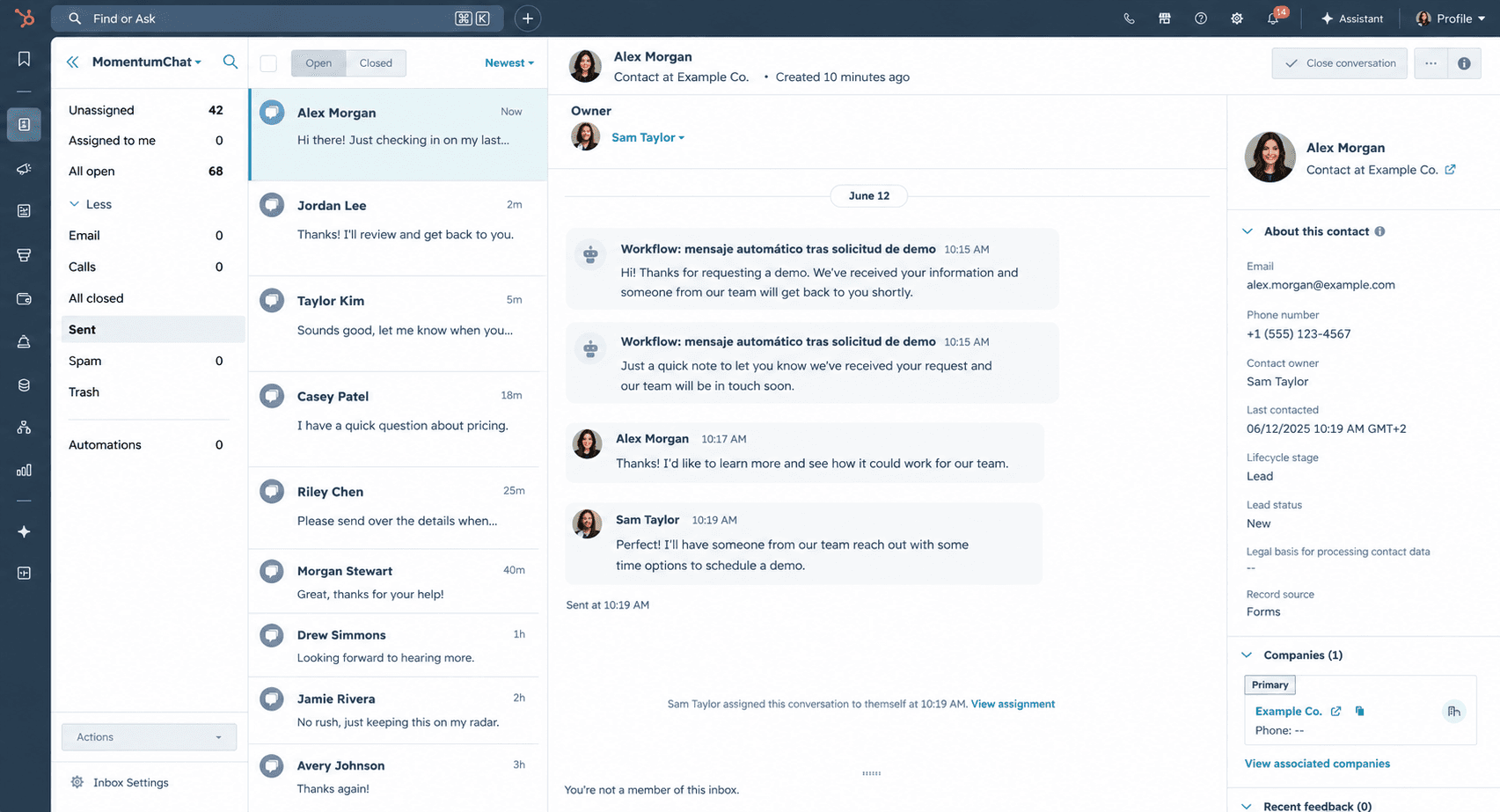
Receive
Every message flows into your HubSpot inbox. Incoming conversations match to existing contacts automatically. New contacts are created when there's no match.
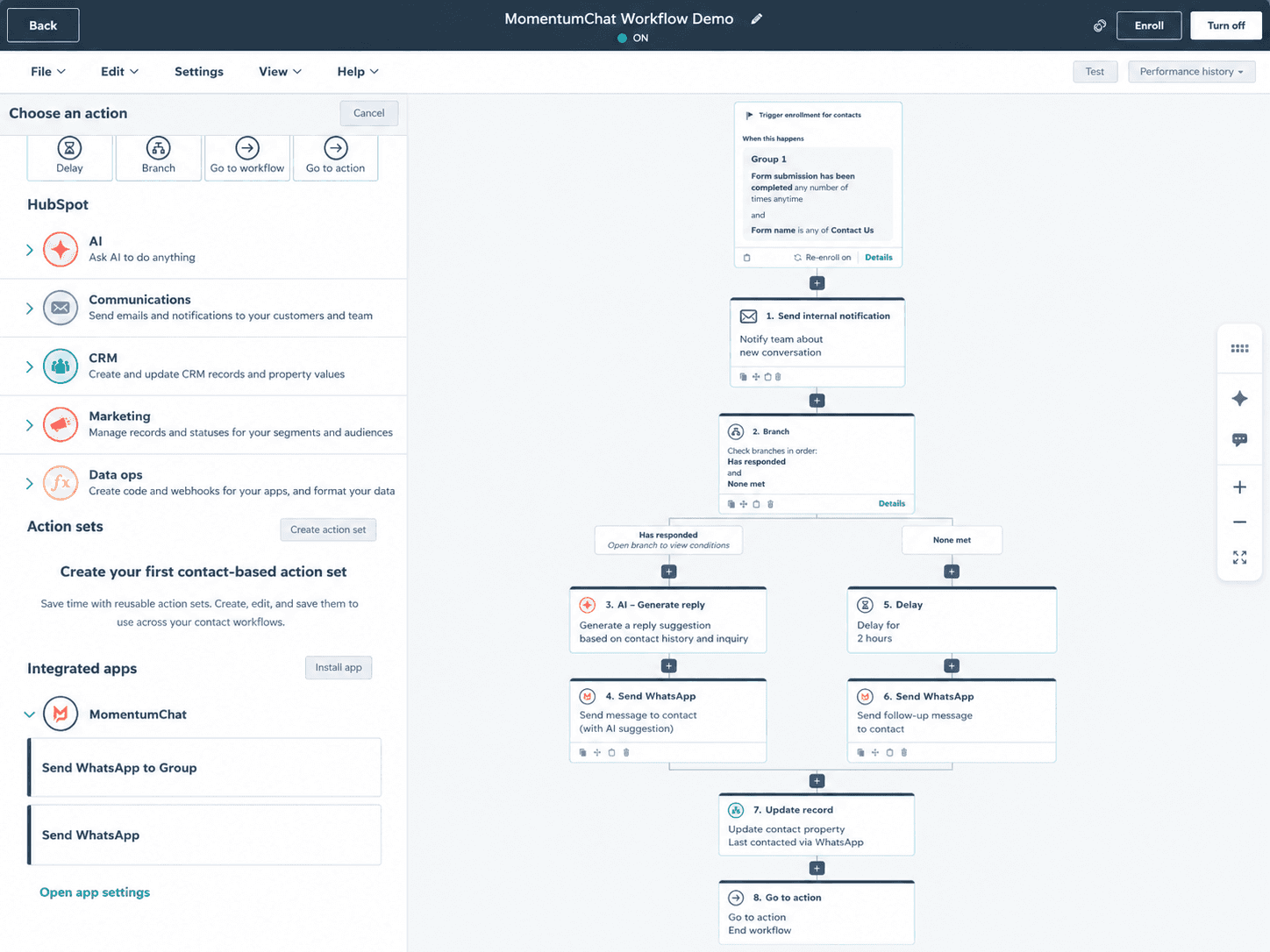
Automate
Add MomentumChat actions to any HubSpot workflow. Send WhatsApp messages when leads fill forms, deals change stages, or tickets are created.
A proper HubSpot channel, not a workaround.
MomentumChat uses HubSpot's standard conversation and communication objects. Every feature that works for email or live chat works for WhatsApp.
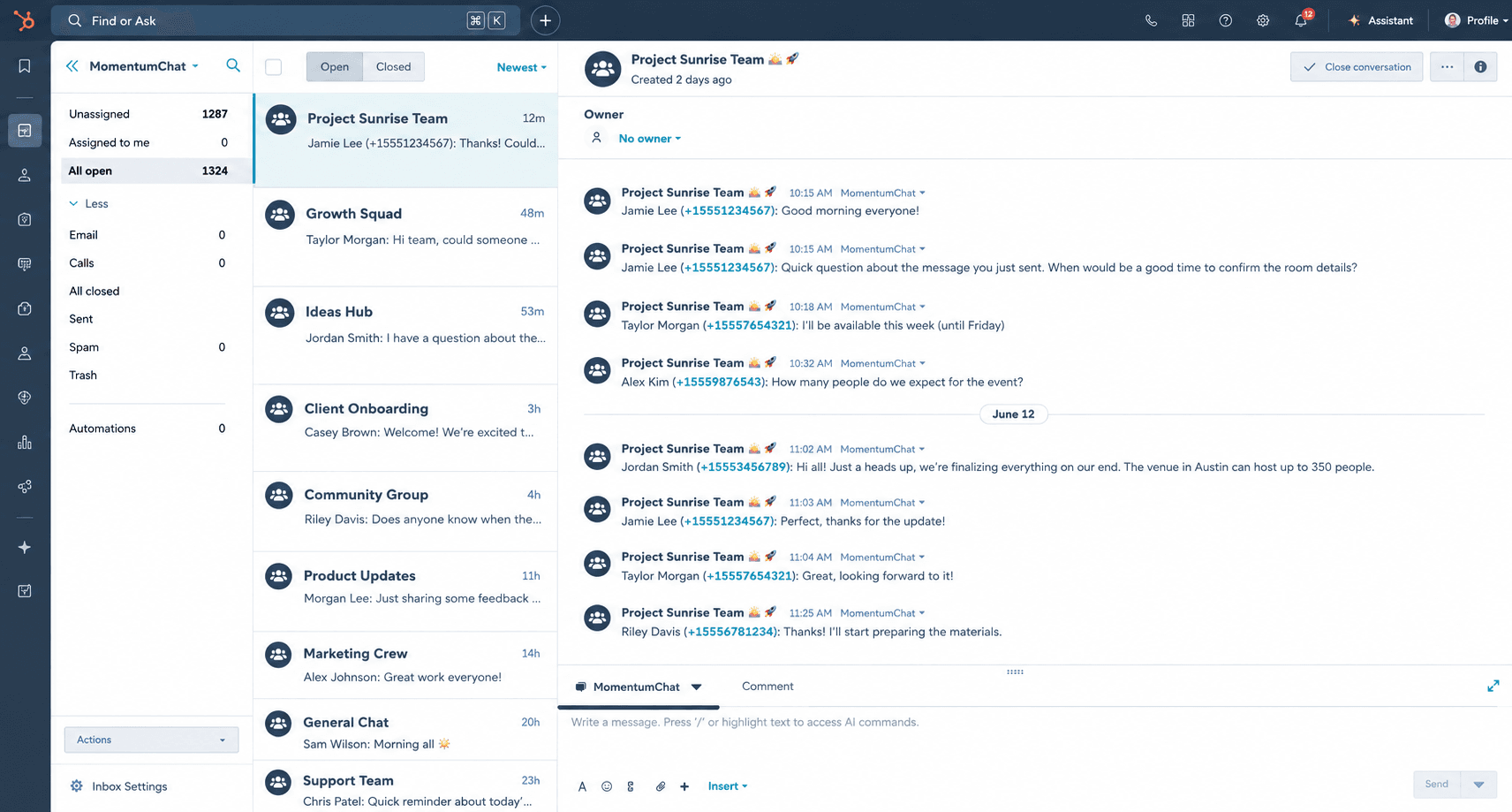
Native inbox
Not a sidebar, not a Chrome extension. A channel in your HubSpot inbox, same as email or live chat.
All message types
Text, images, documents, audio messages, stickers, groups. Nothing gets dropped.
HubSpot permissions
Access control through HubSpot's own system. Set who reads, who replies, which teams see which inboxes.
Full reporting
Conversations, response times, message volume: all available in HubSpot reports. Same data model as any native channel.
Breeze AI ready
Connect HubSpot's AI agent to WhatsApp in a few clicks. Conversation history, handoff notes, and resolution data stay in HubSpot.
Personal numbers
No need to migrate to a business account. Personal numbers work. Business numbers work. Both at the same time.
Group conversations
Send to and receive from WhatsApp groups. Manage group threads in the same inbox as one-to-one conversations.
No API limits
No message templates required. No 24-hour windows. No per-message fees. Send what you want, when you want.
What happens when a lead fills your form at 11pm.
HubSpot workflows can now trigger WhatsApp messages. That changes how you handle the moments that actually decide whether a lead converts.
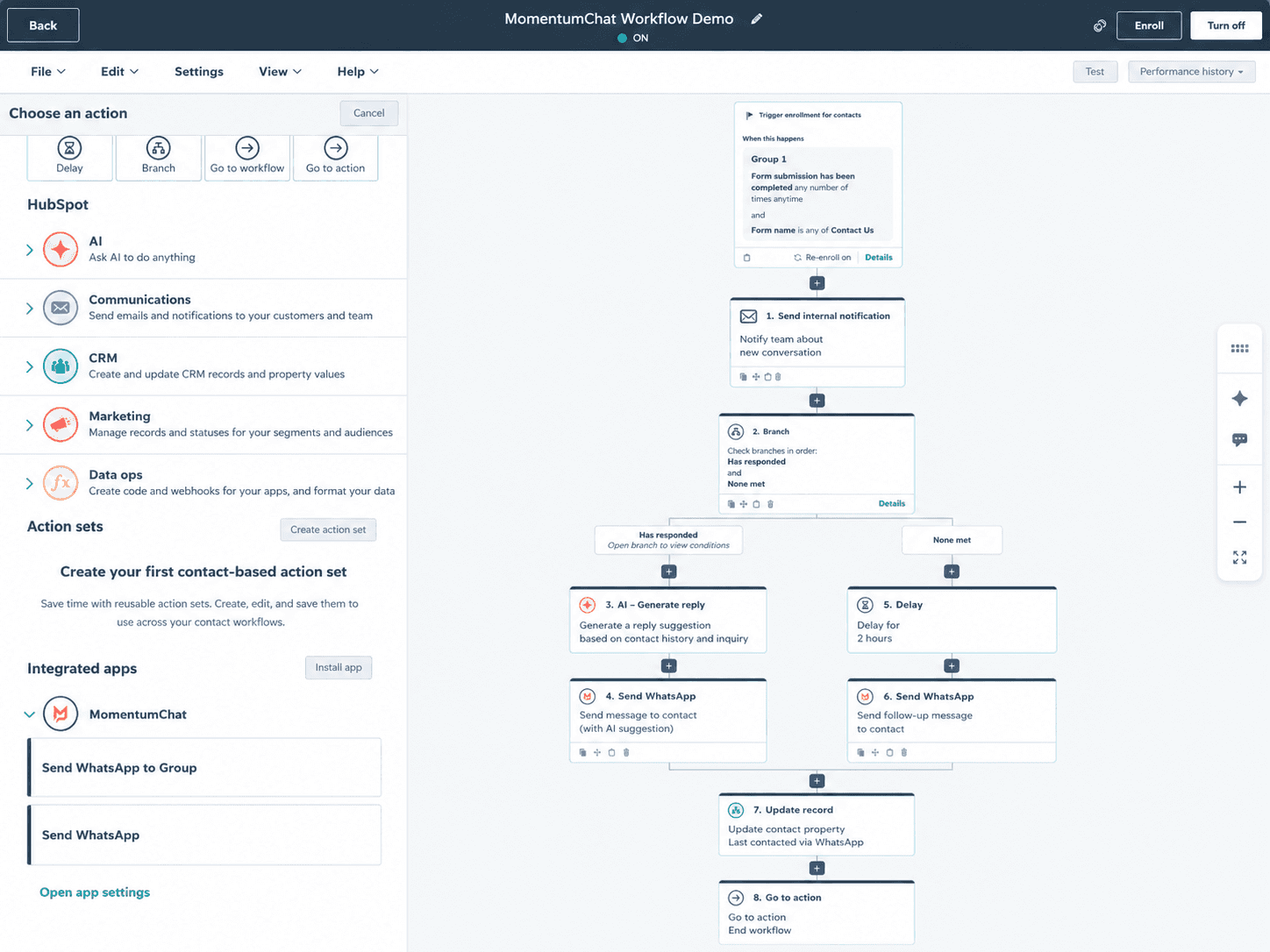
Immediate acknowledgement
A lead fills your demo form outside business hours. A workflow sends a WhatsApp immediately: 'Thanks, we'll confirm your slot in the morning.' The lead feels acknowledged. The rep doesn't get woken up.
Response rate on WhatsApp vs email: 3× higher
Proposal delivered automatically
A deal reaches the negotiation stage. An automated WhatsApp goes to the main contact with the proposal link. The conversation that follows logs back to the deal in HubSpot.
Average time-to-open: under 4 minutes
Three words you'd never have gotten by email
A trial expires. A workflow sends a WhatsApp asking what stopped them. The response rate on this kind of message is ten times what you'd get from a re-engagement email.
Churn recovery rate: up to 18% in pilot clients
Ticket notifications where your team actually reads them
A high-priority ticket is created. The assigned rep gets a WhatsApp with the ticket link. Not an email they'll read tomorrow morning.
Breeze AI
Your HubSpot AI agent, now on WhatsApp.
Breeze AI can handle first-line responses, qualify leads, and escalate to a human when needed. Because MomentumChat uses HubSpot's standard conversation object, connecting the AI to WhatsApp takes about four clicks.
Conversation history, handoff notes, and resolution data all stay in HubSpot. When a rep takes over, they have the full context, not a blank thread.
“We went from losing 30% of our WhatsApp conversations to having full pipeline visibility. Setup took less than five minutes.”
Carlos M.
Head of Sales, B2B SaaS
“The API approval route would have taken months. MomentumChat was connected before I finished my coffee.”
Laura P.
RevOps Manager
“My reps close deals on WhatsApp. Now those deals actually show up in HubSpot. That's the whole pitch.”
Jordi F.
Sales Director
€100 per number, per month.
Unlimited users. No per-message costs. Cancel any time.
HubSpot
€100 / number / mo
Full channel integration. Inbox, workflows, reporting, Breeze AI: everything.
API
€100 / number / mo
Programmatic access only. Send and receive messages via API. For teams building on top.
Common questions.
MomentumChat is built by MomentumHUB.
MomentumHUB is a RevOps agency specialising in HubSpot strategy, implementation, and operations. If you need help connecting your processes, not just your tools, we work with B2B teams from 50 to 200 people.
Get WhatsApp inside HubSpot today.
Takes 30 seconds to connect. No Meta API approval required.